

Microsoft's Copilot portfolio has expanded rapidly, with new products, services and licensing. There are now several different products tied to the Copilot family, and the names do little to help you tell them apart.
This guide explains the options available in 2026, the differences between different Copilot products, how much they cost, and how to prepare for deployment.
Table of contents
What are the different versions of Microsoft Copilot?
Copilot is Microsoft's AI assistant. It helps users work faster and more effectively. Here are the current Microsoft Copilot licences.
-
Microsoft Copilot (free): for personal use at copilot.microsoft.com, in the Copilot app, in Microsoft Edge, and when you use Microsoft Bing. No access to your work data.
-
Microsoft 365 Copilot Chat (free): for businesses with eligible Microsoft 365 business plans. Secure, web-grounded AI that cannot access your organisation's work data.
-
Microsoft 365 Copilot Business (paid): for users with eligible Microsoft 365 Business plans. Up to 300 users. Can access your firm’s Microsoft 365 data.
-
Microsoft 365 Copilot (paid): the same functionality as Copilot Business, but for unlimited seats. Requires an eligible Microsoft 365 or Office 365 enterprise plan.
-
Microsoft Security Copilot: integrates with other services, such as Microsoft Defender XDR, and helps security professionals improve incident response.
-
GitHub Copilot: an AI coding assistant that helps developers write code faster while avoiding errors.
-
Microsoft Copilot Studio: a low-code graphical tool that you can use to create agents and connect to other data sources, to automate your business workflows.
Microsoft also offers Personal and Family Copilot plans. But these lack data-protection and governance features and so are not suitable for businesses.
Is the free version of Copilot safe for business use?
When it comes to security, only some versions are safe for business use, particularly with confidential data.
-
The free consumer version is a genuine data risk for business use, offering no Enterprise Data Protection. It isn't covered by the enterprise commitments that keep your data out of model training, and there is no tenant boundary. It's fine for casual queries, but wrong for anything that touches business information.
-
Copilot Chat (free with Microsoft 365 Business and Enterprise plans) is a different proposition. It comes with Enterprise Data Protection, so your prompts stay inside the tenant boundary and aren't used to train models. It's safe to use at work if you don't put any client-sensitive data into it. Its limitation isn't security, it's reach: Copilot Chat is web-grounded only, so it can't read your emails, files, or meetings, or act inside your documents.
So, the real question isn't whether the free version is secure enough. Both Copilot Chat and Microsoft 365 Copilot are secure. It's whether you want an AI that can work with your business data. For companies that want this, there are two main versions of Copilot: the free Microsoft Copilot Chat and the paid Microsoft 365 Copilot.
Copilot Chat vs Microsoft 365 Copilot: what's the real difference?
Both Microsoft 365 Copilot Chat and Microsoft 365 Copilot Business use the same AI model. The difference is what they can access, the level of data integration, and the cost.
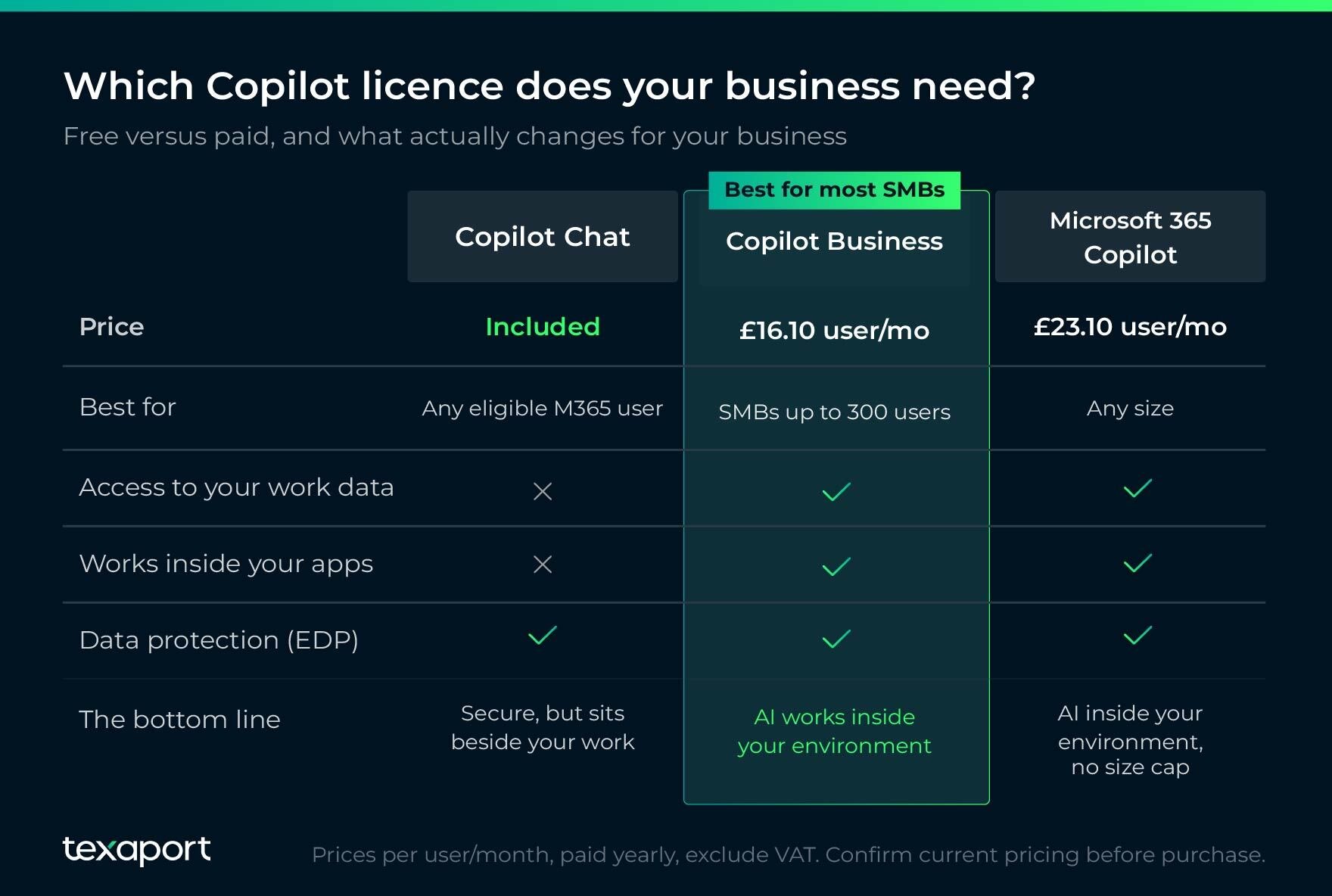 Microsoft Copilot Chat is:
-
Web-grounded. It stores your prompts, questions, and the tasks you set in your tenant boundaries. But its source of knowledge is the public web.
-
Unable to access your company’s files, emails, calendars, Teams chats, and other sources of business-related information. It works next to your work, not inside it.
-
Not integrated with Microsoft Office, so you don’t get in-app Copilot assistance within Microsoft Word, Excel and other Office programs.
Microsoft 365 Copilot Business and Microsoft 365 Copilot (for enterprises) remove that wall. They are grounded in your own data. This means they can read the company’s internal documents and work as an assistant inside Microsoft productivity apps such as Word, Excel, etc.
This access to your data is what makes Microsoft 365 Copilot more capable than the free versions. But it also underlines why it’s vital to prepare for Copilot deployment.
Your organisation’s permissions, data governance, and content hygiene must allow Copilot to access your business data safely.
| Microsoft Copilot Chat | Microsoft 365 Copilot Business | Microsoft 365 Copilot (for enterprises) | |
| What is it? |
Free, web‑grounded chat included with eligible plans |
Paid per-seat add-on for eligible Microsoft 365 Business plans |
Paid per-seat add-on for eligible Microsoft 365 Enterprise plans |
| Who is it for? |
Eligible Microsoft 365 customers |
Organisations with up to 300 users |
Organisations of any size |
| Prerequisites |
Eligible Microsoft 365 subscription |
Eligible Microsoft 365 Business plans (Basic, Standard, Premium) |
Eligible Microsoft 365 Enterprise plans (E3, E5) |
| What can it do? |
Reasons over web data, with Enterprise Data Protection and limited work-data access. |
Everything Copilot Chat can do. Plus reads your files, emails, meetings, and works inside Word, Excel, PowerPoint, Outlook and Teams. |
|
| What it can’t do |
See or act on your organisational data |
Anything beyond what the permissions you specify allow it to do. |
|
| Business impact |
Safe general AI, but employees still switch tools to do real work |
AI is embedded in the work itself, fully dependent on how your data is governed. |
|
How much does Microsoft 365 Copilot cost in the UK?
Microsoft 365 Copilot Chat is included with Microsoft 365 at no extra cost.
Microsoft 365 Copilot Business and Microsoft 365 Copilot (for enterprises) are add-on products. You'll need a qualifying Microsoft 365 plan, but only users who need Copilot require a licence.
For SMBs:
-
Microsoft 365 Business Premium with Copilot - £24.60 per user per month.
-
Microsoft 365 Business Standard with Copilot - £18.10 per user per month.
- Standalone Microsoft 365 Copilot Business - £16.10 per user per month.
For enterprises:
-
Standalone Microsoft 365 Copilot - £23.10 per user per month.
Prices excluding VAT, annual subscription.
It’s also important to factor in that licence costs are only part of the investment. You'll need to budget for employee training, data preparation and AI governance.
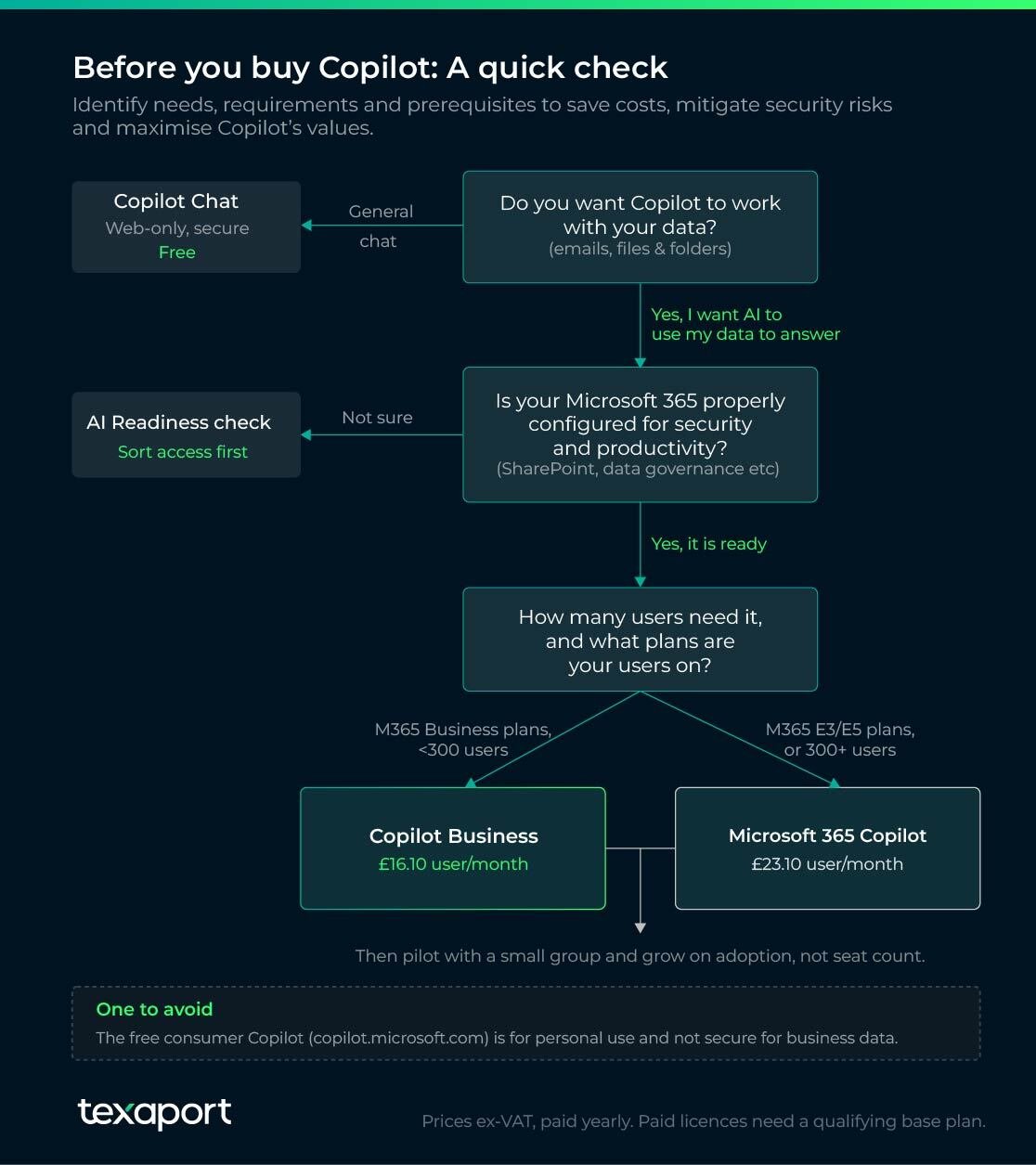
How to get ready for Copilot deployment
Microsoft 365 isn't secure by default. How safe it is, and how much it can contribute to your business efficiency, depends very much on how well your environment is configured.
Copilot makes it easier for users to quickly find data, summarise it, and integrate it into new work. Within a properly secured and configured site, that’s extremely valuable.
However, if SharePoint permissions are too broad, Copilot will surface files to whoever asks. If old data has no sensitivity labels, Copilot treats it like anything else.
When Texaport assesses an environment before Copilot goes in, this is what we look at:
-
SharePoint & OneDrive permissions: we audit to uncover where access is broader than it should be, and what Copilot would expose as a result.
-
Sensitivity labelling & data governance: our experts discover whether sensitive content is labelled and handled, or sitting open.
-
Cost-effective seat allocation: who genuinely needs a licence, so you're not paying for seats that you don’t need.
-
Base plan & configuration: whether the underlying Microsoft 365 plan qualifies and is configured to good practice rather than left at defaults.
Businesses often lack the expertise to carry out a pre-deployment audit on their own. The answer is external expertise in Microsoft Copilot deployment.
On sensitivity and data labelling in particular, it helps to have expert advice. Some advanced data-management features are only included in enterprise editions of Microsoft 365.
Some advanced governance features require Microsoft Purview Suite. Organisations that need automated, AI-driven data protection may find this worthwhile. Smaller businesses can often use the manual controls included in Microsoft 365 Business Premium.
Working with a Microsoft 365 specialist is often the quickest way to assess readiness, close security gaps and create an AI acceptable-use policy before rollout.
What's the best way to roll out Copilot?
To deploy Microsoft Copilot quickly, with the shortest possible time to benefit and the least disruption, you should:
-
Roll out gradually: don’t buy every seat on day one. This is often the quickest way to waste money. Adoption, not licences, delivers the return.
-
Start with a pilot: deploy to high-value users who spend their day in email, documents and meetings. Define success metrics before the rollout begins.
-
Train your employees: training is easy to skip but expensive to ignore. Copilot rewards good prompting, so build training into the pilot before expanding.
This is also where readiness work pays off twice. A clean, well-governed Microsoft 365 environment enables a pilot to succeed rather than stalling due to permission issues.
If you'd rather not manage it yourself, our Microsoft-certified engineers can handle Copilot deployment and adoption end-to-end.
Texaport is a Microsoft Partner. Our engineers are certified in Copilot and can help you prepare your Microsoft 365 environment for Copilot, from security and governance to deployment and user adoption. Learn how Texaport can help you roll out Microsoft Copilot with confidence, or contact us to discuss your organisation's readiness.
Microsoft 365 Copilot licensing: Frequently asked questions
1. Is Copilot included in my Microsoft 365 subscription?
Copilot Chat is available at no additional cost for Entra account users with one of the following licences:
-
Microsoft 365 A1/A3/A5 (including MA3/MA5 for students, MA3/MA5 for faculty, and MA3/MA5 student-use benefit)
-
Microsoft 365 Business Basic/Business Standard/Business Premium
-
Microsoft 365 G3/G5
-
Microsoft Teams/Teams Enterprise/Teams Essentials/Teams Rooms
-
Office 365 A1/A1 Plus/A3/A5
-
Office 365 E1/E1 Plus/E3/E5
-
Office 365 F3
-
Office 365 G1/G3/G5
However, Microsoft 365 Copilot is not part of any other subscription. It is a paid add-on with more advanced features, such as deeper integration with your work data sources and the ability to work as an assistant inside Microsoft Office applications.
2. Do I need a separate licence to use Copilot in Word and Excel?
Yes. Copilot requires its own licence even if you already have Word, Excel, and the rest of Microsoft 365.
3. Can small businesses get Microsoft 365 Copilot?
Yes. Organisations with up to 300 users can add Microsoft 365 Copilot Business to eligible Microsoft 365 Business plans.
4. How much does a Microsoft Copilot licence cost?
The basic, web-grounded Microsoft Copilot Chat is free. The cost of a paid-for licence depends on which version of Microsoft 365 you’re using. Microsoft 365 Copilot Business, the licence suitable for most small-to-medium businesses, costs £16.10/user/month paid yearly.
For the bigger picture on getting your Microsoft 365 costs right, see our guide to Microsoft 365 licence optimisation.
5. Can I get Copilot Pro for my business?
Copilot Pro was intended for personal use and has now been retired and is no longer available. It is now bundled in Microsoft 365 Premium.